Tracking installed POSM and complaints
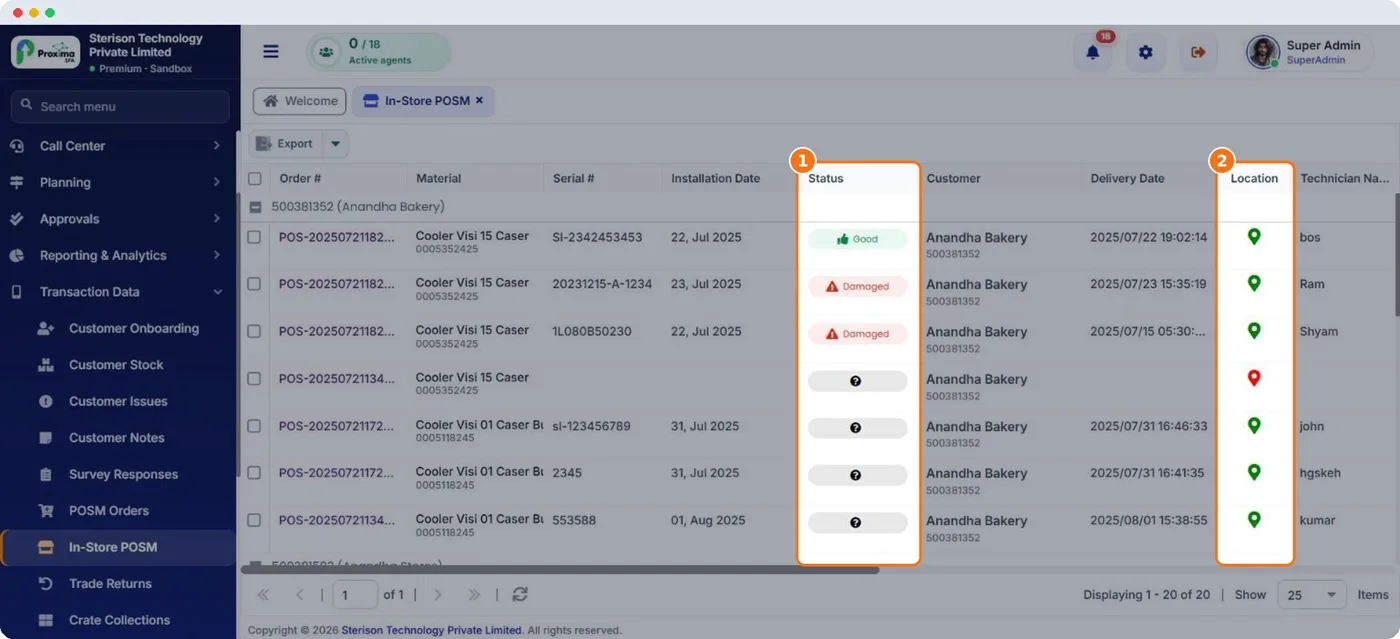
In-Store POSM
Transaction Data › In-Store POSM lists every asset in the market: material, customer, serial number, installation date, technician, location, condition, photos and complaints. Filter by condition to find what needs attention.
| Condition | Meaning |
|---|---|
| New | Just installed. |
| Good | Working and in good shape at the last check. |
| Damaged | Reported damaged. |
| Under Repair | Being fixed. |
Scan codes
Give each material a scan code type: Barcode, QR Code or Manual Entry. Reps then scan the label on the cooler or rack during a visit, which confirms the asset really is in that shop.
Complaints
How to
- The rep raises a complaint in the field app with the serial number, issue type (Broken, Missing, Dirty or Not Working), priority, location, description and photos.
- The complaint appears in POSM Complaints in Nexus with its status.
- When it is fixed, click Close Complaint and add remarks on what was done. Proxima records who closed it and when.
Tip
Sort open complaints by priority every week. A broken cooler in a top shop costs sales every day it waits.
Related guides: In-store POSM · Tracking and complaints (field app) · POSM materials.
Still stuck?
Message our support team on WhatsApp in English, Tamil, Malayalam or Hindi.